
Summary:
“The global threat landscape is constantly evolving, and the types of attacks that can cripple a business and exploit consumers are on the rise. It's more important than ever to implement stronger security measures. Which is why we're announcing a future requirement for all customers to enable MFA. MFA is one of the easiest, most effective tools for enhancing login security, and safeguarding your business and data against security threats.” –Salesforce
As of February 1, 2021, MFA (multi-factor authentication) will begin to be required for all internal Salesforce users (and therefore Flowhaven internal users). For more information on the announcement, please see this article from Salesforce.
This requirement will slowly be rolled out over the coming weeks. Flowhaven will assist with this configuration by February 14.
Important Note: this new MFA requirement does not apply to your external partners who log in via force.com.
Multi-factor authentication is a security measure added in the user login process and it is available for our clients to enable in the system. It adds an additional layer of security to your valuable data in our system as it requires users to submit more pieces of information for accessing the system.
Here are the options available for complying with the Salesforce MFA requirement, and what it means to you (as a Flowhaven user) if you log in directly through the Salesforce user interface.
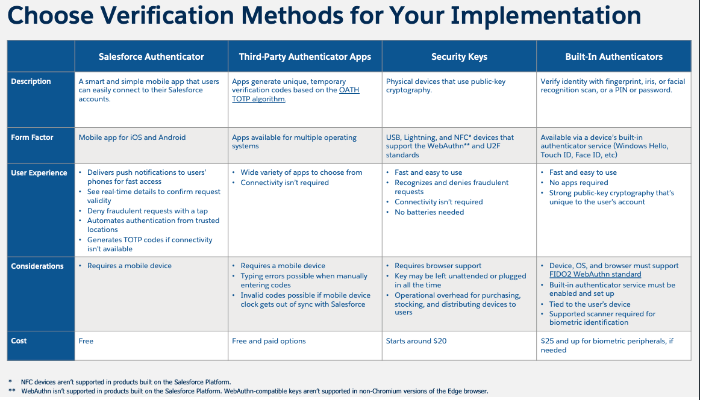
Salesforce MFA requirement means that an extra authentication step is added in your user login process. See (2) for a list of valid options once this setting is enabled:
- username and password
- Verification from at least one of the following options
- Salesforce Authenticator App
- Third-Party Authenticator Apps based on the OATH time-based one-time password (TOTP) algorithm (RFC 6238).
- Security keys that are compatible with FIDO U2F and FIDO2 WebAuthen
- Built-in authenticators by verifying a user's identity with a device's biometric reader, such as fingerprint, iris, or facial recognition scanner.
Flowhaven will assist you in enabling MFA for users who access Salesforce directly with a Salesforce login (technical setup) and will discuss with you an execution date (no later than the required date by Salesforce). Once the setup is complete, the user login experience is described below.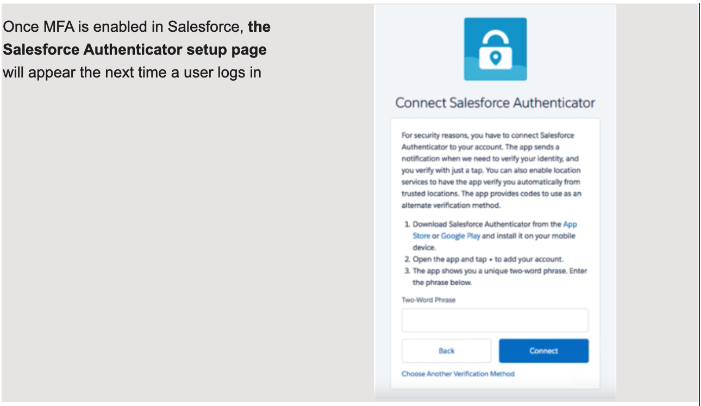
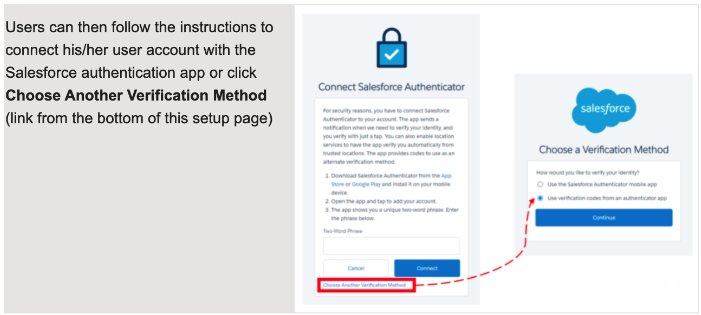
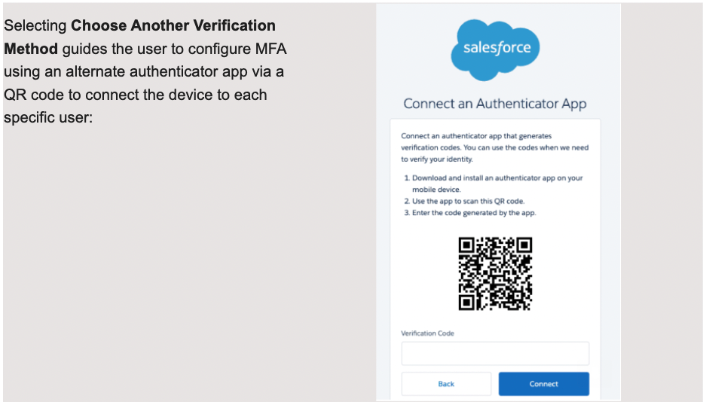
If you are accessing your Flowhaven Salesforce environment by another identity provider via SSO configuration, please note that the compliance to Salesforce’s MFA requirement shall be enabled by your identity provider support. If MFA is already enabled for your SSO identity provider, you don’t need to enable Salesforce’s MFA for users who log in via SSO.
Please note: Flowhaven cannot configure authentication methods such as any other authentication apps or security keys on your company's behalf. Please consult with your internal IT department as soon as possible, if need be, so that they may complete the necessary configurations.
As always our Flowhaven Customer Success team is here to support you and your teams. Please reach out to your Customer Success Manager with any questions or you may work through this set up together during your next meeting.
References
- Salesforce Multi-Factor Authentication FAQ (last update De 21st, 2021)
- Multi-Factor Authentication Quick Guide for Admins
- FAQs About MFA for SSO Logins to Salesforce Products
As always, we thank you for your continued partnership.
The Flowhaven Team
Comments
0 comments
Article is closed for comments.